Read the meter
RikUI's damage meter shows the game's own combat numbers in RikUI windows. Each row is one player or creature: rank, name, the amount, the per-second rate in brackets and their share of the fight. Bars take class colours and ease to their new length.
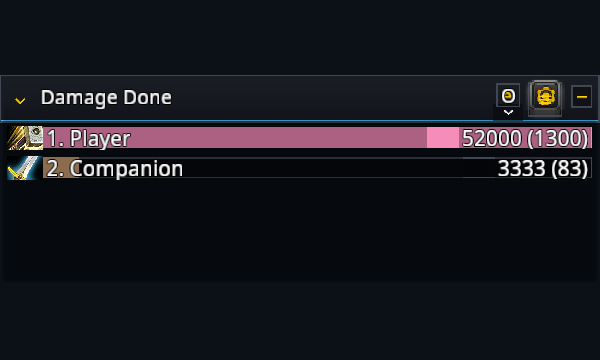
During combat the game hides the numbers from addons. They still show, but in the order the game sends them, without a share, and the rows sort by amount again once the fight ends. Your own row stays in the last line of a window when you are further down the list.
Choose what a window shows
Click a window's title to pick its view. Every type the game tracks is listed: damage done, DPS, healing, HPS, absorbs, interrupts, dispels, damage taken, avoidable damage taken, deaths and enemy damage taken. Counted views such as interrupts show no rate.
Click the fight name on the right to pick the current fight, overall, or any earlier fight the game still keeps. Reset all fights clears them. RikUI remembers current or overall for each window; an earlier fight is picked again after a reload.
Look closer
Click a player to see their spells. The back arrow returns to the list. Out of combat this works for anyone; in combat the game hides who a row is, so spell detail opens once the fight ends. In the deaths view, clicking a death opens the game's death recap.
Report to chat
The copy button sends the window's title and its top five rows to chat. It offers raid, party or guild when you are in one, and say. Reports wait until combat ends, because the numbers are hidden until then.
Windows, place and size
Under the Damage meter settings, Windows stacks up to three windows in the meter's place, each with its own view and fight. Scroll a window with the mouse wheel.
Use /rik move to move the meter, and drag its corner grip to resize it. Show damage meter is the
game's own damage meter switch. Blizzard's meter stays hidden while RikUI's is on. Disable
Damage meter under Settings → System → Modules and reload to get the game's meter back.